
How to Access the Camera Timer on iPhone 11 and iPhone 11 Pro
How to Access the Camera Timer on iPhone 11 and iPhone 11 ProFriday September 27, 2019 9:20 AM PDT by Tim HardwickApple has redesigned the native Camera app for the iPhone 11 and iPhone 11 Pro to make the most of the enhanced phot

Table of Contents
How to Access the Camera Timer on iPhone 11 and iPhone 11 Pro
 Apple has redesigned the native Camera app for the iPhone 11 and iPhone 11 Pro to make the most of the enhanced photography capabilities of its new flagship phones and to make space for the various additional shooting options available.
As a result, some of the functions that you may be used to seeing in the camera interface on older iPhones have moved around. The shutter timer is an example. Here's how to access it on iPhone 11, iPhone 11 Pro, and iPhone 11 Pro Max.
- Launch the Camera app on your iPhone.
- Tap the chevron at the top of the viewfinder to reveal the additional settings strip above the shutter button. Alternatively, swipe up from the camera mode menu at the bottom of the viewfinder.
- Tap the timer button.
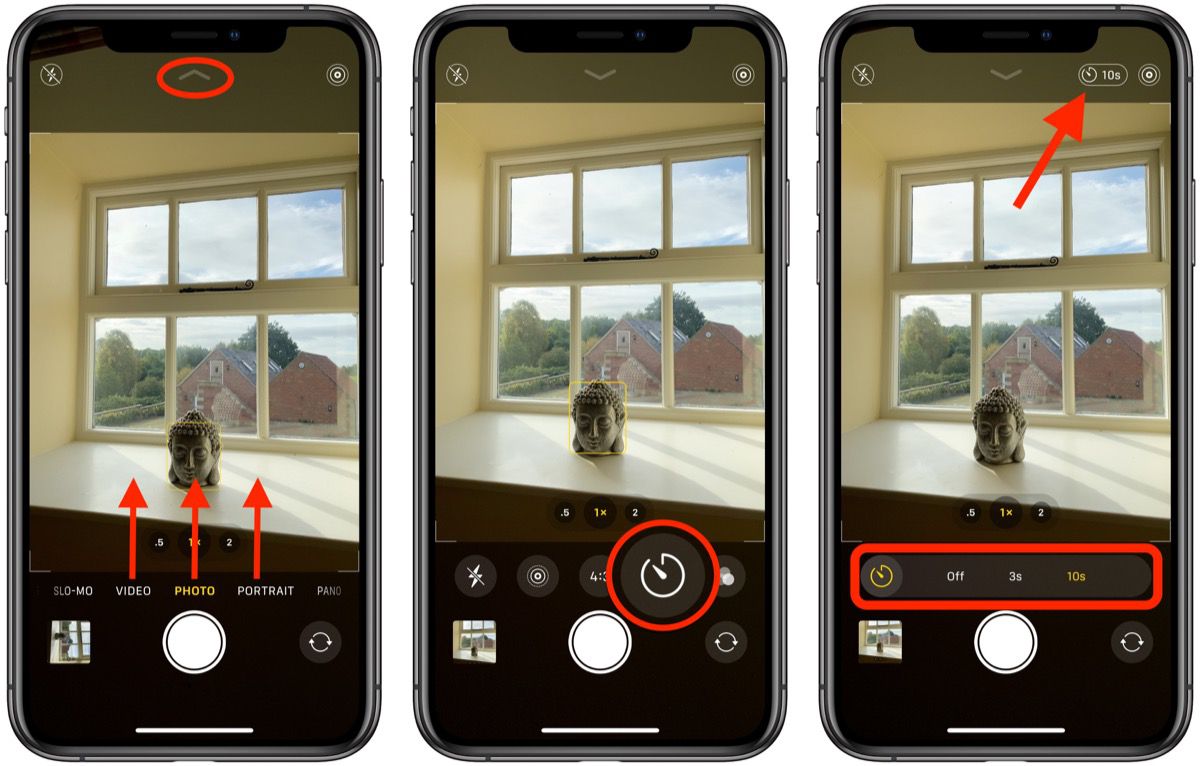
- Choose the 3s or 10s option. Your timer selection will appear above the viewfinder.
- Tap the shutter button to take a picture after the selected time has elapsed.
In addition to the timer, the camera settings strip includes options to access Night Mode, Live Photos, aspect ratios, and filters. Note that the timer option isn't available in some camera modes, including Video, Slo-mo, Pano, and Time-lapse.
Popular Stories

Apple Responds to iPhone Duo Display Cracking Reports

Crackgate? iPhone Duo Owners Report Screens Breaking Along the Hinge

