
How to Access Website Settings in Safari for iOS
How to Access Website Settings in Safari for iOSFriday August 2, 2019 4:38 PM PDT by Tim HardwickWith the release of iOS 13, Apple introduces some additional features to its native Safari mobile web browser. One of the most welcom

Table of Contents
How to Access Website Settings in Safari for iOS
 With the release of iOS 13, Apple introduces some additional features to its native Safari mobile web browser. One of the most welcome new changes in Safari is the ability to customize a range of settings for individual websites.
Like Safari on Mac, the Website Settings section allows you to configure different viewing and security options for specific websites, and Safari then applies them automatically so you don't have to bother with them again. Here's where you can find it.
- Navigate to a site you frequently visit.
- Tap the "aA" icon in the top-left corner of the screen to reveal the Website View menu.
- Tap Website Settings.
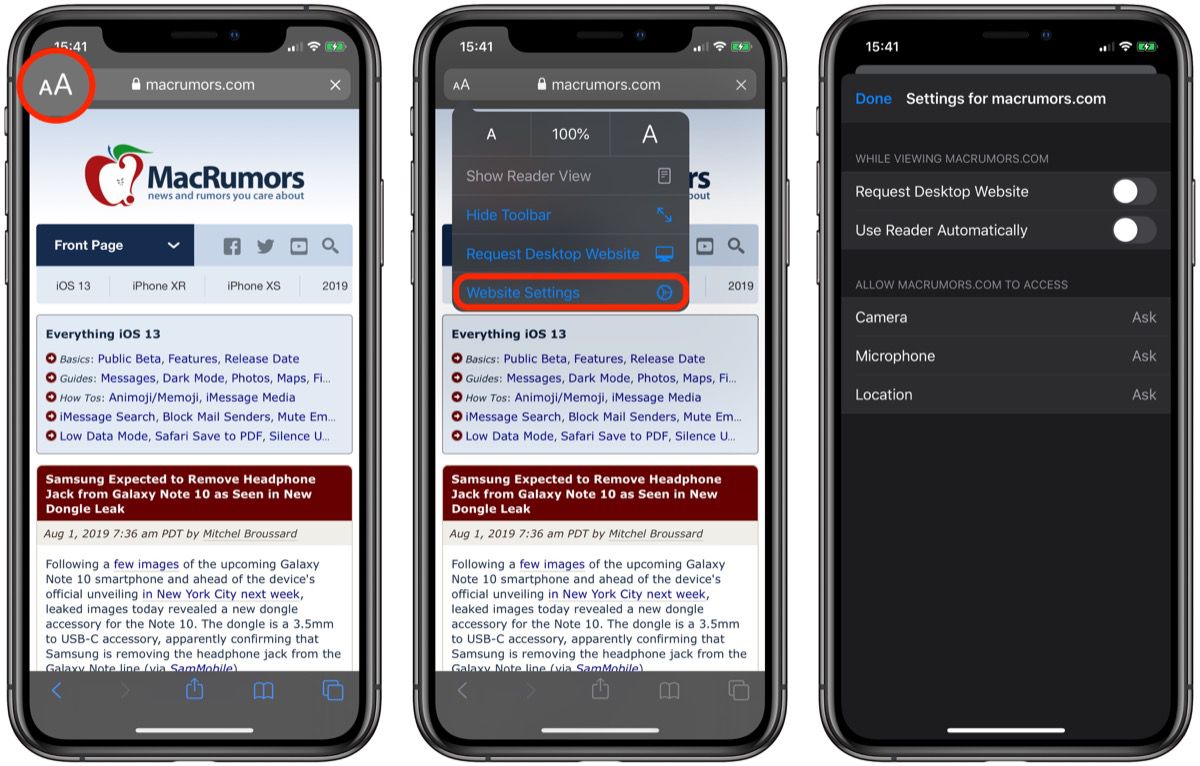
Reader Mode: Safari's built-in Reader mode strips online articles of extraneous web page content to make them more readable. Reader is usually enabled by tapping an icon that sometimes appears in the far left of the address bar, but you can check "Use Reader Automatically" to switch to this by default.
Request Desktop Website: Mobile-friendly websites are often stripped down and streamlined for easier navigation, with the result that some full-page content isn't displayed at all. Even when it is, finding that content can sometimes be a chore, especially if you're used to the desktop version of a site. Fortunately, Apple has had the foresight to let you bypass mobile versions of websites and view original desktop versions on its mobile devices instead.
Camera, Microphone, Location: The last three options in Website Settings let you choose whether to allow or deny the site access to your iOS device's camera and microphone, and whether to enable location detection. You can opt to "Allow" or "Deny", but if your preference is likely to change from time to time for these, set them to "Ask", and Safari will query you whenever access is requested by the site.
Popular Stories

Apple Explains Why Chrome Users Should 'Switch to Safari'

Apple Wants to Fix Safari's Cramped Layout on iPhone Duo
