NEWS · Apple How-To

How to Add Attachments to Calendar Events in iOS

How to Add Attachments to Calendar Events in iOSMonday September 16, 2019 5:14 PM PDT by Tim HardwickIn iOS 13, Apple has added the ability to attach files to events in the Calendar app. It's a neat feature to have available becau

vinkoweb · Oct 28, 2026 · 5 views
How to Add Attachments to Calendar Events in iOS

Table of Contents
  1. 1. Popular Stories
  2. 2. Apple Responds to iPhone Duo Display Cracking Reports
  3. 3. Apple Announces New iPad Mini With 8.5-Inch OLED Display, A20 Pro Chip, and More
  4. 4. Apple Announces New 14-Inch MacBook Pro With M6 Chip
  5. 5. Next Article

How to Add Attachments to Calendar Events in iOS

by Tim Hardwick

iphone calendar icon 5In iOS 13, Apple has added the ability to attach files to events in the Calendar app. It's a neat feature to have available because it means that when an event comes around you'll have any related documents or information immediately to hand.

For example, if you have a vacation or business trip coming up, you can attach flight times, hotel reservations, emails, and other relevant files you might need so they don't get lost in your inbox. The steps below show you how to attach files to events in the Calendar app.

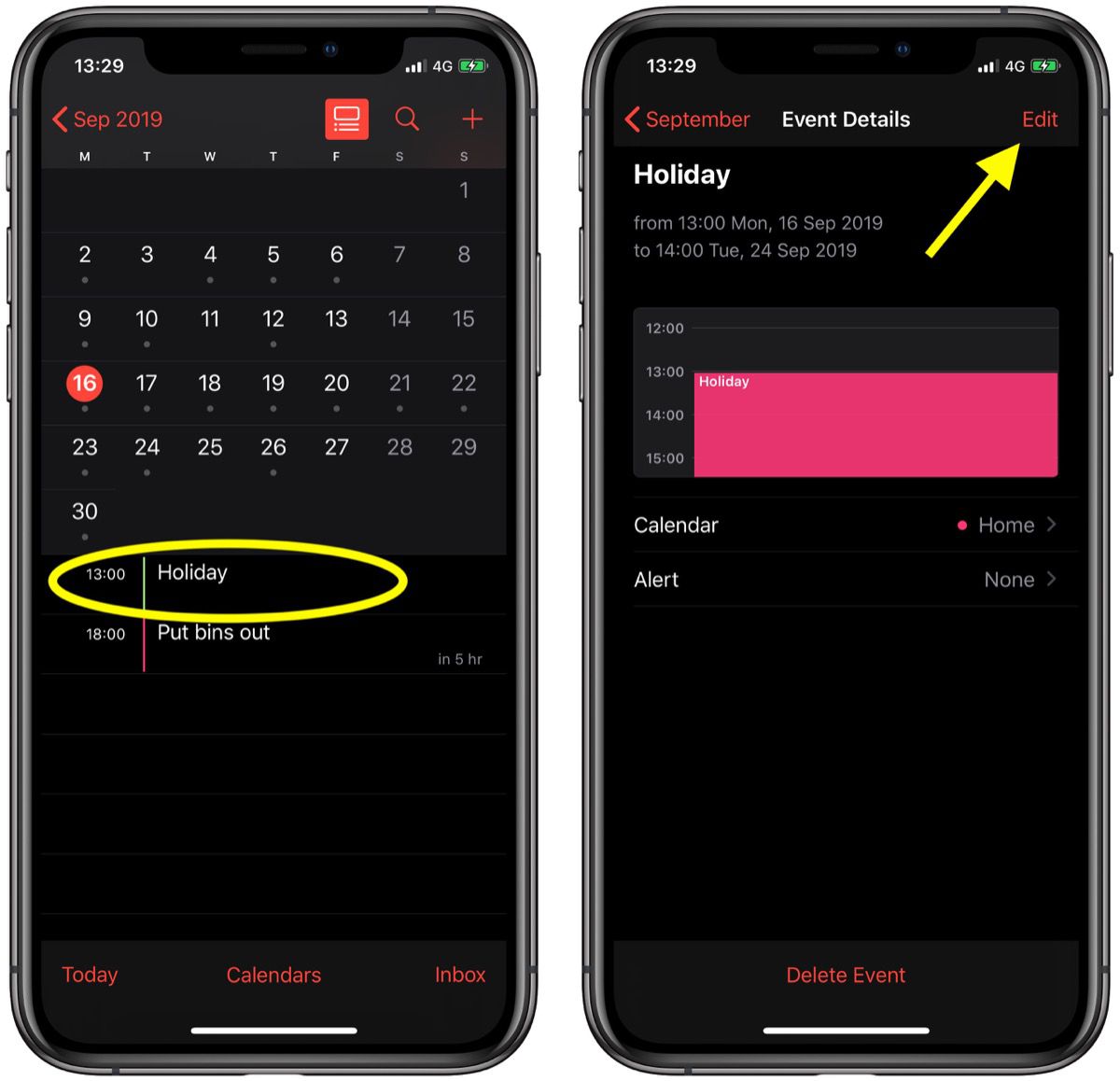
  1. Launch the stock Calendar app on your iPhone or iPad then tap an event that you want to attach a file to or create a new event. In our example, we're working with an existing event.
  2. Tap Edit in the top-right corner of the screen.
    calendar
  3. Scroll down and tap Add attachment....
  4. Tap the file you want to attach in Recents, or choose the Browse tab to navigate to a file, then tap it.
    calendar
  5. Tap Add attachment again to attach additional files if you wish, and tap Done in the top-right corner of the screen when you're finished.how to add attachements to calendar events ios 2

That's all there is to it. To open your attachments any time, simply select the calendar event and tap the attachments one by one to open them individually.

Related Forum: iOS 13
iphone duo screen crack

Apple Responds to iPhone Duo Display Cracking Reports

Monday October 26, 2026 10:20 am PDT by Juli Clover
Shortly after the iPhone Duo launched, a few users reported hinge issues that were causing cracks in the inner display. Apple has now responded to the reports in a statement to MacRumors, saying a small number of units are affected. The response to iPhone Duo from early users has been incredibly positive, and we are seeing exciting things from developers who are rapidly updating their apps...
iPad mini OLED feature 1

Apple Announces New iPad Mini With 8.5-Inch OLED Display, A20 Pro Chip, and More

Monday October 26, 2026 6:05 am PDT by Joe Rossignol
Apple today announced a new iPad mini with a larger 8.5-inch OLED display, a nano-texture display option, a thinner and lighter design, an A20 Pro chip, a new Acoustic Display audio system that eliminates speaker holes, IP67-rated water and dust resistance, a landscape front camera, Apple's N1 chip with Wi-Fi 7 and Bluetooth 6 support, and more. Altogether, Apple says this amounts to the iPad...
Apple MacBook Pro 14 in with M6 hero

Apple Announces New 14-Inch MacBook Pro With M6 Chip

Tuesday October 27, 2026 6:01 am PDT by Hartley Charlton
Apple today announced a refreshed 14-inch MacBook Pro featuring the M6 chip, upgraded connectivity specifications, and more. The M6 chip in the MacBook Pro features a 12-core CPU with 2 super cores, 4 performance cores, and 6 efficiency cores, paired with a 12-core GPU. This is up from the M5 chip with a 10-core CPU with 4 super cores and 6 efficiency cores, paired with a 10-core GPU. M6...
'); }
← More tech stories