How to Change the Wallpaper in the Home AppWednesday February 20, 2019 5:06 PM PST by Marianne SchultzLike the home screen on your iPhone and iPad and the desktop on your Mac, you can customize the background of the Home app. The
Like the home screen on your iPhone and iPad and the desktop on your Mac, you can customize the background of the Home app. The default image of a fence draped in red leafy vines is nice, but you may want an image with some personal meaning or a different aesthetic. Making a change is easy.
In the Home app on an iPhone or iPad:
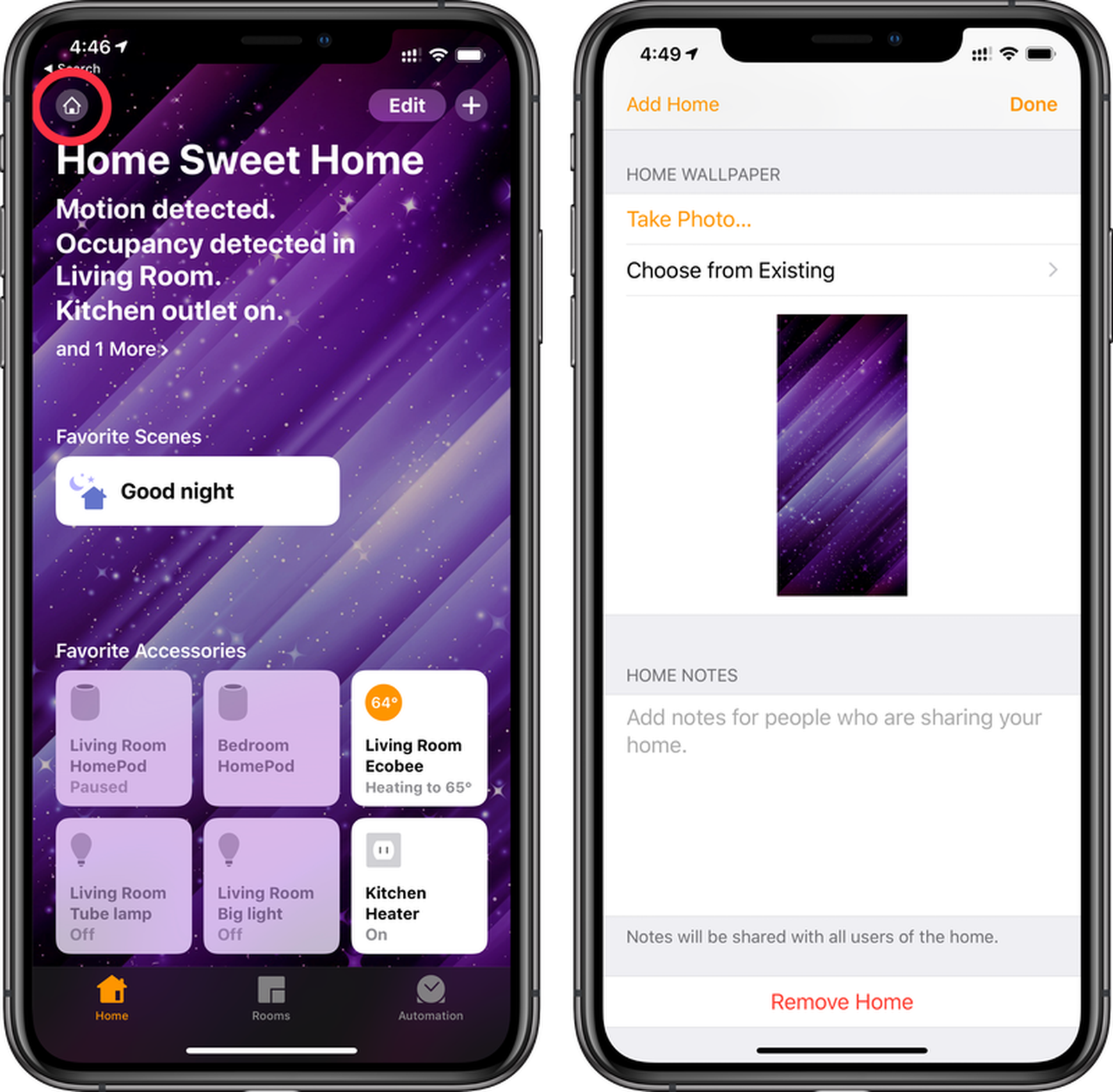
Click on the home icon in the top left corner.
Scroll down to the Home Wallpaper section.
Select Take Photo if you want to capture an image with the device's camera to use as the background.
Or tap on Choose from Existing to select a photo from your photo library.
On a Mac:
Open the Home app then click the Edit menu.
Click Edit Home.
Scroll down to Home Wallpaper.
Choose one of the available wallpapers shown.
To use an image you already have on your Mac, just drag and drop the image into the open Home app and it will replace the existing wallpaper.
Note that the Home app wallpaper does not sync across your devices so you can set them individually by device.
Wednesday October 7, 2026 6:26 am PDT by Hartley Charlton
FCC filings reveal the designs of three upcoming LG smart home accessories that Apple reportedly helped develop, including a thermostat, a temperature sensor, and a deadbolt lock.
Yesterday, Bloomberg reported that Apple is working with LG Electronics on accessories for its upcoming home hub and other home products, citing regulatory documents without sharing the filings. FCC records MacRumor...
Wednesday September 30, 2026 4:46 am PDT by Hartley Charlton
Apple is working to revamp HomeKit amid a new push into the smart home market, according to Bloomberg's Mark Gurman.
In a report that detailed the impending launch of next-generation Apple TV and HomePod mini models, as well as Apple's all-new smart home hub, Gurman said that the company is developing broader smart-home ecosystem software for its devices.
Apple apparently plans to expand ...
Friday October 9, 2026 7:50 am PDT by Hartley Charlton
Smart home accessories that Apple reportedly helped LG develop could offer iPhone proximity controls and a way to begin setup before the devices have power, according to findings shared by the leaker known as "pdfu."
The findings concern the upcoming LG-branded accessory range that Bloomberg revealed earlier this week. The lineup reportedly includes a thermostat, temperature sensor, deadbolt ...