
How to Close or Force Quit iPad Apps
How to Close or Force Quit iPad AppsWednesday January 19, 2022 5:24 PM PST by Tim HardwickApple designed its iPadOS software so that you don't have to close an app when you're not using it, since most apps that are not active rema
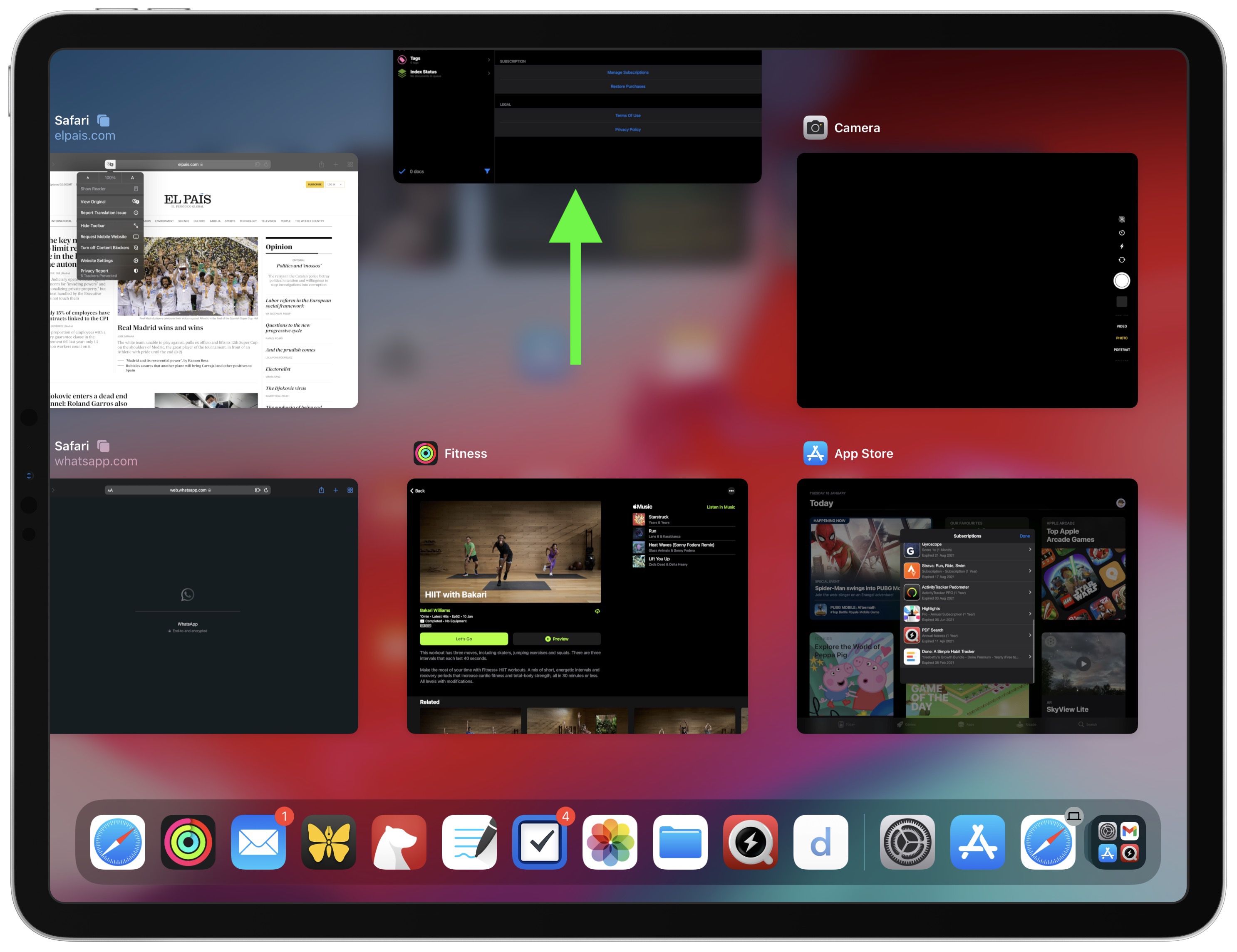
Table of Contents
- 1. How to Close Apps on iPads With a Home Button
- 2. How to Close Apps on iPads With No Home Button
- 3. Popular Stories
- 4. Apple Responds to iPhone Duo Display Cracking Reports
- 5. Crackgate? iPhone Duo Owners Report Screens Breaking Along the Hinge
- 6. iPhone Duo Fails JerryRigEverything's Dusty Durability Test
- 7. Next Article
How to Close or Force Quit iPad Apps
Apple designed its iPadOS software so that you don't have to close an app when you're not using it, since most apps that are not active remain in a suspended state and don't use up any resources or eat up battery.

However, if an iPad app becomes unresponsive, you may need to force quit the app and restart it to get it to work properly again. Here's how you can do that on both older and newer iPads.
How to Close Apps on iPads With a Home Button
- Double-click the Home button to show your most recently used apps.
- Swipe right or left in the App Switcher gallery to find the app that you want to close.
- Swipe up on the app's preview card to close the app.
How to Close Apps on iPads With No Home Button
On iPads without a Home button, a whole different set of gestures are used, one of which involves the App Switcher and the way open apps are found and closed.
- On the Home screen of the iPad, or while in an app, swipe up from the bottom of the screen and pause for a moment while still pressing the screen, then let go when the App Switcher appears.
- Now swipe left and right through the rows of app cards to find the app that you want to close.
- Use a quick swipe upwards to close the app.
It's worth reiterating that there's generally no need to close apps that aren't playing up in order to improve performance, as Apple has built-in management systems for dealing with all of the apps that you have open on your device.
According to Apple, force quitting a working app will not improve your battery life, and it's possible that doing so can actually drain battery because it causes the iPhone or iPad to load it all over again.
Popular Stories

Apple Responds to iPhone Duo Display Cracking Reports

Crackgate? iPhone Duo Owners Report Screens Breaking Along the Hinge

