
How to Install the iPadOS Public Beta
How to Install the iPadOS Public BetaTuesday June 25, 2019 2:12 PM PDT by Tim HardwickApple released a public beta of iPadOS for compatible iPad models, enabling users who aren't signed up for the Apple Developer Program to test t
Table of Contents
- 1. Is iPadOS Compatible With My iPad?
- 2. How to Create a Backup of Your iPad in iTunes
- 3. How to Enroll in the Apple Beta Software Program
- 4. How to Install the iPadOS Public Beta
- 5. Popular Stories
- 6. Apple Responds to iPhone Duo Display Cracking Reports
- 7. Apple Announces New iPad Mini With 8.5-Inch OLED Display, A20 Pro Chip, and More
- 8. Apple Announces New 14-Inch MacBook Pro With M6 Chip
- 9. Next Article
How to Install the iPadOS Public Beta
Apple released a public beta of iPadOS for compatible iPad models, enabling users who aren't signed up for the Apple Developer Program to test the software update ahead of its official release in the fall.
iPadOS is a rebranded version of iOS 13 specially made for iPads, with extra features designed to take advantage of larger tablet displays. It includes an updated Home screen, improved multitasking functionality, new Apple Pencil functionality, support for external drives, folder sharing in Files, text editing improvements, and all of the other new changes in iOS 13.

With that said, bear in mind that iPadOS is pre-release software, so installing the public beta on a secondary device is highly recommended. The stability of beta software cannot be guaranteed, as it often contains bugs and issues that have yet to be ironed out, so installing it on your day-to-day device isn't advised.
Is iPadOS Compatible With My iPad?
Apple's list of compatible devices confirms that iPadOS is compatible with all of these iPad models:
- 12.9-inch iPad Pro 3rd generation
- 12.9-inch iPad Pro 2nd generation
- 12.9-inch iPad Pro 1st generation
- 11-inch iPad Pro
- 10.5-inch iPad Pro
- 9.7-inch iPad Pro
- iPad 6th generation (2018 model)
- iPad 5th generation
- iPad Air 3 (2019 model)
- iPad Air 2
- iPad mini 5 (2019 model)
- iPad mini 4
Installing the Public Beta shouldn't take longer than half an hour, but first you should create a backup of your device's contents and settings by following the step-by-step instructions below.
How to Create a Backup of Your iPad in iTunes
- Connect your iPad to a Mac or PC using a Lightning to USB cable or a USB-C to USB cable, depending on the model.
- Open iTunes.
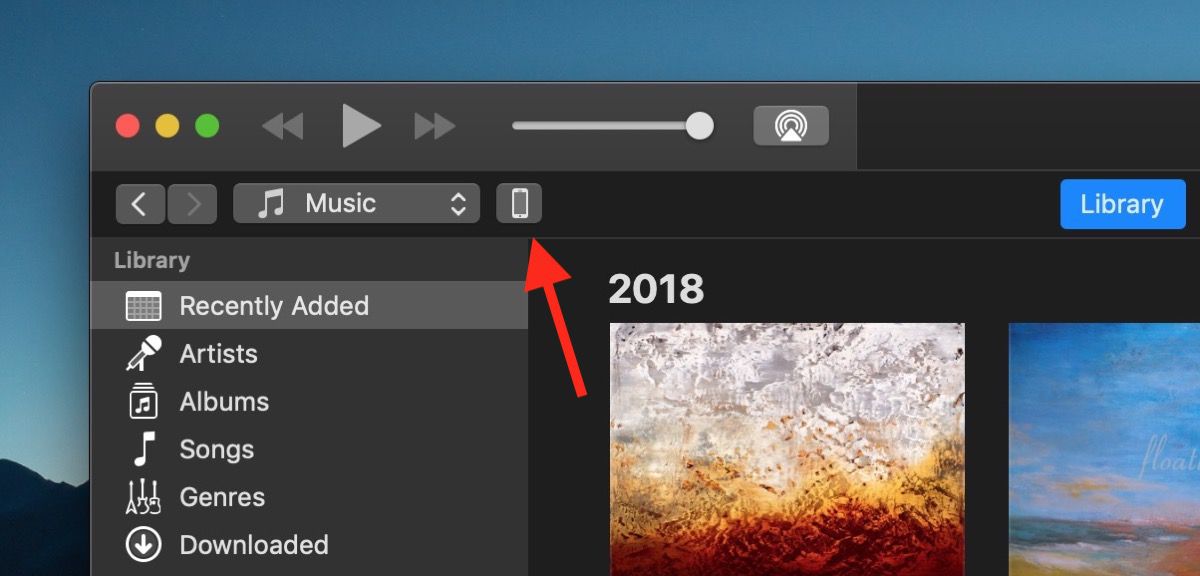
- Click the device icon in the top-left menu and select your iPad.
- Under Backups, click This computer.
- Tick the Encrypt local backup checkbox if you want to securely back up your login credentials and any Health and HomeKit data.
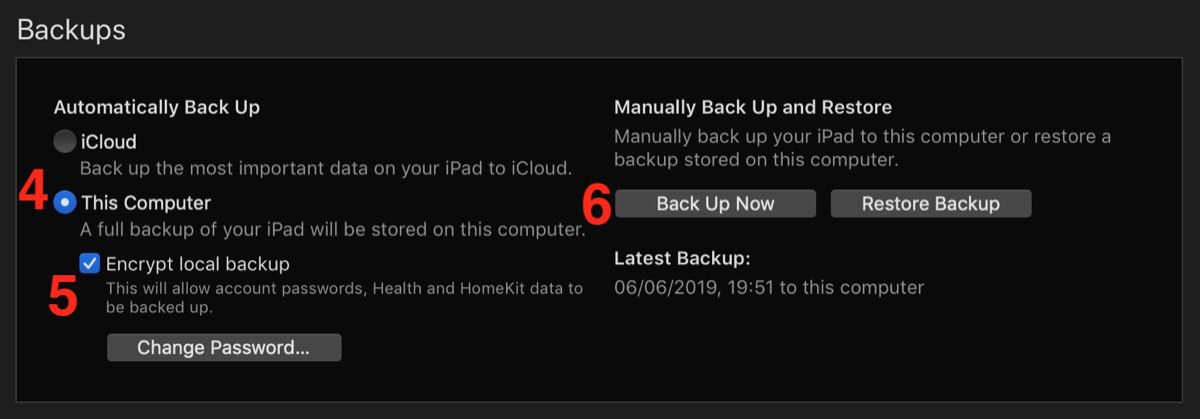
- Click Back Up Now.
- Click iTunes -> Preferences… in the macOS menu bar.
- Click the Devices tab.
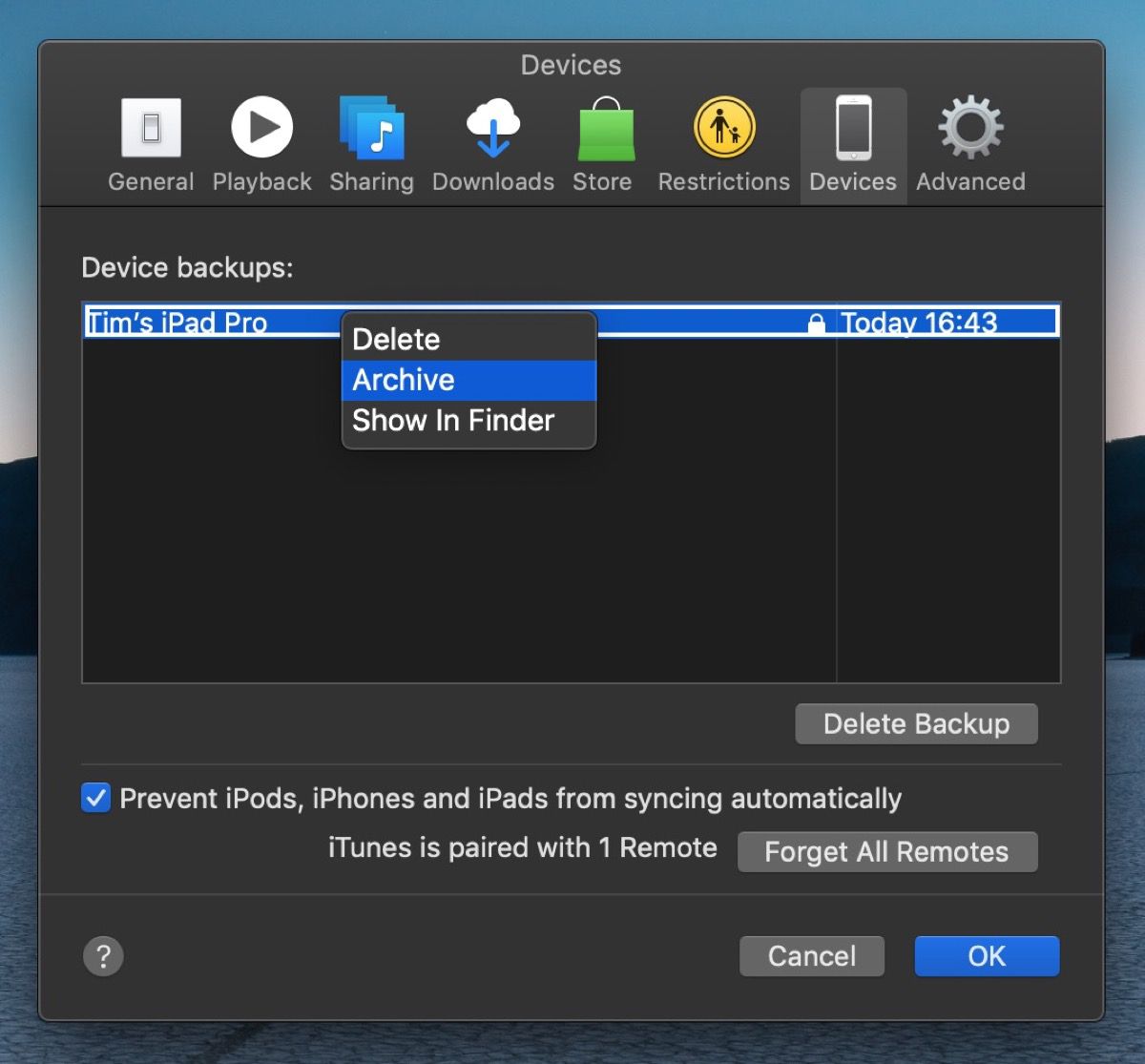
- Right-click (or Ctrl-click) the new backup, and select Archive from the contextual dropdown menu.
How to Enroll in the Apple Beta Software Program
Now that you've backed up your device, you're ready to download the iPadOS Public Beta. To do so, you must enroll your iPad in the free Apple Beta Software Program.
- Open Safari on your iPad and navigate to the Apple Beta Software Program.
- Tap the Sign up button, or sign in if you're already a member.
- Enter your Apple ID credentials and tap the Sign in button.
- Agree to the Apple Beta Software Program terms and conditions if necessary.
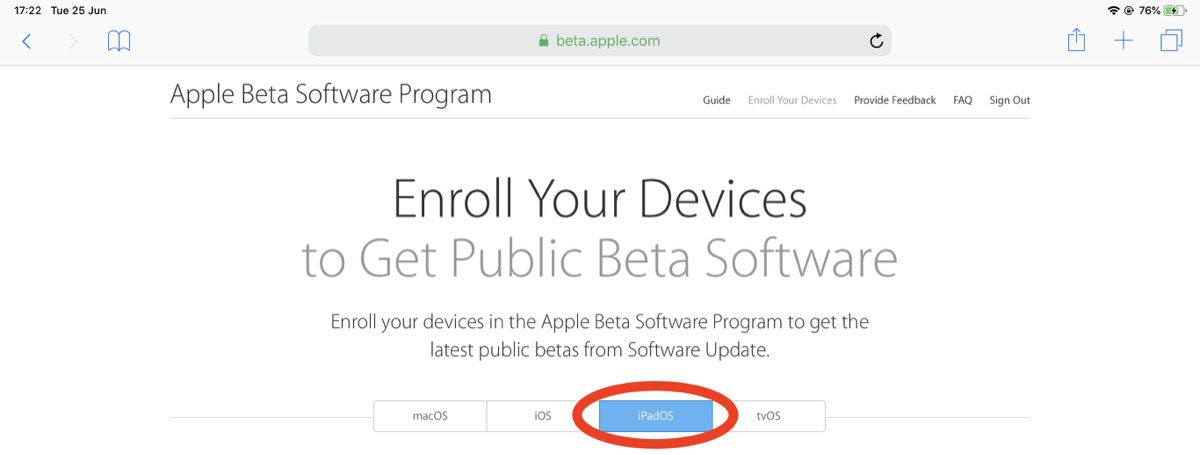
- A Guide for Public Betas screen will appear. Select the iPadOS tab, scroll down to the Get Started section and tap enroll your iOS device.
- On the Enroll Your Devices screen, with the iPadOS tab selected, scroll down and tap the Download profile button.

- Tap Allow at the profile prompt.
- Launch the Settings app on your iOS device and then tap Profile Downloaded below your Apple ID banner.
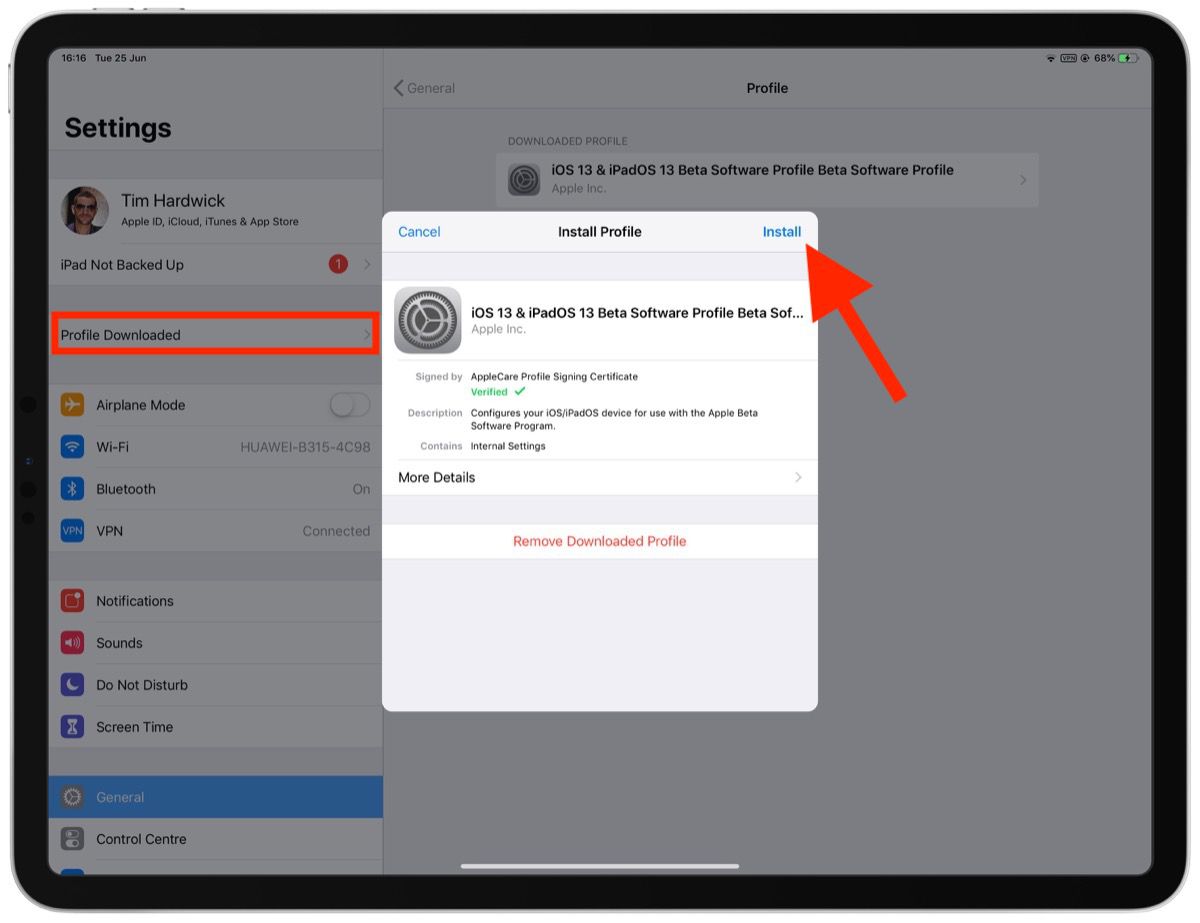
- Tap Install and follow the prompts to install the iOS Beta Software Profile.
- Restart your device after installing the profile by tapping the restart popup.
How to Install the iPadOS Public Beta
Once you're enrolled in the Apple Beta Software Program, you can install the iPadOS Public Beta on your iOS device just as you would a regular software update.
- Launch the Settings app on your iPad.
- Tap General -> Software Update.
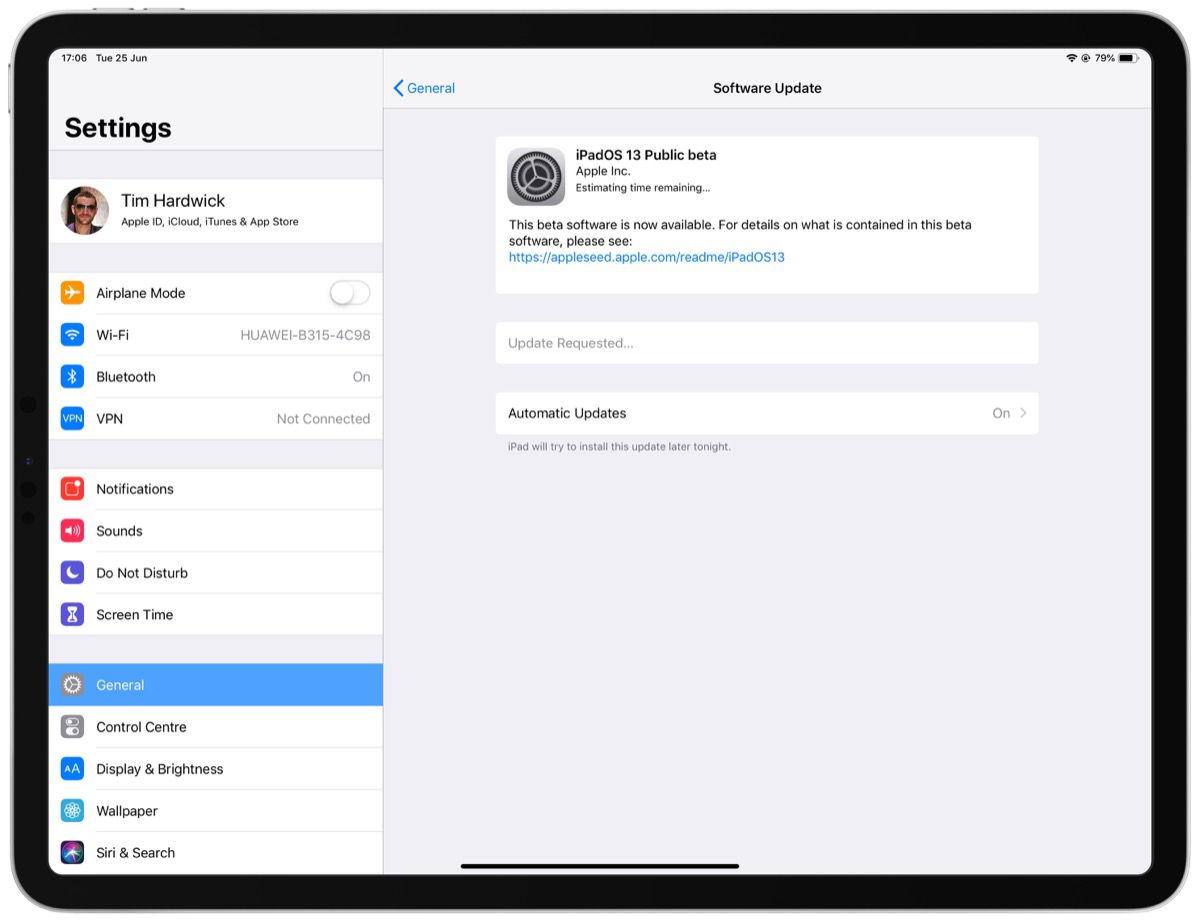
- Tap Download and Install.
- Tap Install Now.
If you come across any issues installing the iPadOS Public Beta, it may help to clear any previous profiles lingering on your device. You can find these in the Settings app under General -> Profile.
Want to discuss the iPadOS beta? Make sure to check out our iOS 13 discussion forum.
Popular Stories

Apple Responds to iPhone Duo Display Cracking Reports

Apple Announces New iPad Mini With 8.5-Inch OLED Display, A20 Pro Chip, and More

