How to Take Burst Photos on iPhone and iPad
How to Take Burst Photos on iPhone and iPadWednesday October 10, 2018 12:18 PM PDT by Tim HardwickBurst Mode refers to when the camera on your iOS device captures a series of photos in rapid succession, at a rate of ten frames per

Table of Contents
- 1. How to View Burst Photos
- 2. How to Save Individual Images in Burst Photos
- 3. Popular Stories
- 4. Apple Responds to iPhone Duo Display Cracking Reports
- 5. Crackgate? iPhone Duo Owners Report Screens Breaking Along the Hinge
- 6. Apple Announces New iPad Mini With 8.5-Inch OLED Display, A20 Pro Chip, and More
- 7. Next Article
How to Take Burst Photos on iPhone and iPad
 Burst Mode refers to when the camera on your iOS device captures a series of photos in rapid succession, at a rate of ten frames per second. It's a great way to shoot an action scene or an unexpected event, since you're always more likely to end up with the picture you were aiming for.
For instance, the picture below was taken when the sun came out momentarily from behind the clouds to throw light on the beautiful yellow ocher leaves of a tree. Burst Mode made it possible to shoot the whole event and then save out the one shot that captured the tree at its most vivid during its brief illumination.
To take a photo in Burst Mode, launch the Camera app from the Lock Screen – if your device is unlocked, select the Camera app from the Home screen or slide the Control Center into view and launch it from there. Once you have a shot in frame, tap and hold the shutter button at the bottom of the Camera interface for the duration of the scene that you're trying to capture.

Notice the counter increase at the bottom of the frame for as long as you hold down the shutter. This indicates how many shots are being captured in the current burst. Simply take your finger off the shutter when you want to end the burst of shots.
When you take a series of burst photos, they automatically appear in the Photo app under the Album name Bursts. You'll also find them in your main Photo Library as well as the Moments section found in the Photos tab. Here's how to view your burst photos and pick out the best images from them for safe keeping.
How to View Burst Photos
- Launch the Photos app.
- Tap a collection of burst photos – they appear in the Photos Library as a single picture, but if you look closely, you'll see more images stacked underneath the top thumbnail image.

- Tap Select at the bottom of the screen.
- Swipe the film strip-like ribbon of images below the photo to view the other shots in the burst.
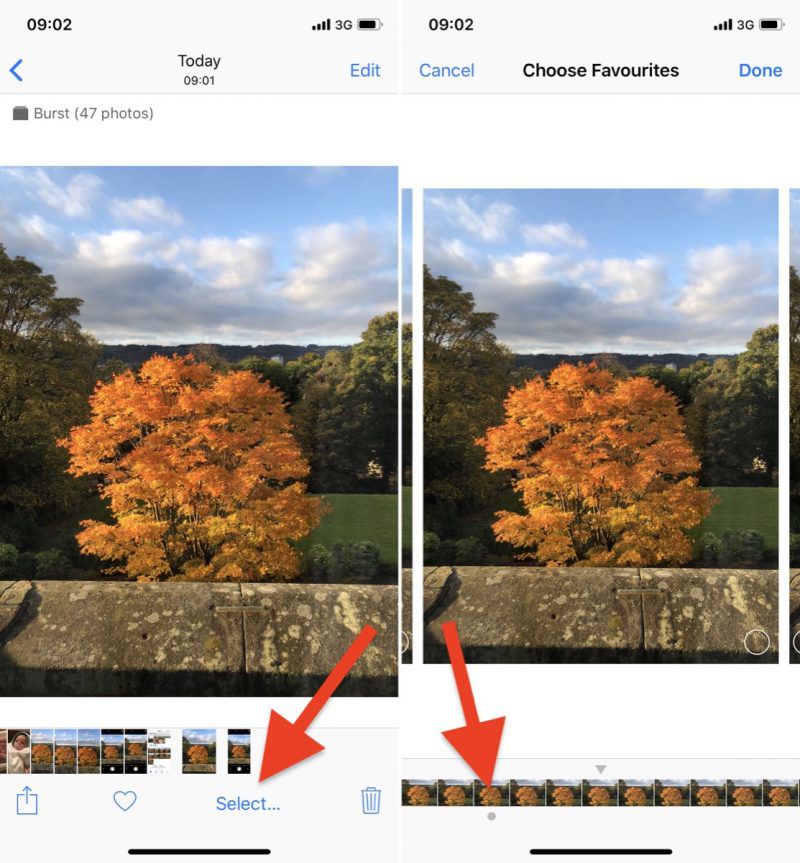
Any dots you see below images in a burst indicate that Apple's algorithms think they have the best focus and detail in the set, but of course you may think differently.
How to Save Individual Images in Burst Photos
- Tap a stack of burst photos in your Photo Library.
- Tap Select in the top-right corner of the screen.
- Tap each image in the series that you want to keep.
- Tap Done in the top-right corner of the screen.
- To keep only the images that you ticked in the burst series, tap Keep Only Favorites. Otherwise, tap Keep everything.

Popular Stories

Apple Responds to iPhone Duo Display Cracking Reports

Crackgate? iPhone Duo Owners Report Screens Breaking Along the Hinge