
iOS 14: How to Send an Audio Message Using Siri
iOS 14: How to Send an Audio Message Using SiriThursday July 16, 2020 12:21 PM PDT by Tim HardwickIn iOS 14, Apple pared down the Siri interface so that it no longer takes over the whole of your iPhone's screen when you issue a vo

Table of Contents
iOS 14: How to Send an Audio Message Using Siri
In iOS 14, Apple pared down the Siri interface so that it no longer takes over the whole of your iPhone's screen when you issue a voice command or query. Instead, a small Siri orb pops up at the bottom of the screen without obscuring what you're looking at.

It's not just the interface that's been improved, though. Siri also picked up several new features, one of which is the ability to record and send audio messages to contacts.
When you send an audio message using the audio interface in the Messages app, the record audio option only appears when the intended recipient is an iMessage user. But Siri can also send audio messages to Android phones. The following steps show you how it's done.
- Invoke Siri on your iPhone or iPad with the usual "Hey Siri" voice command or through a physical button.
- Now say "Send an audio message to [contact's name]." (If Siri is unsure which contact you're referring to, it will ask you to choose one from a selection displayed on the screen.)
- After Siri responds with "OK, recording," say whatever it is you want to include in the audio message. Siri will transcribe your speech in real time at the bottom of the screen to show that it can hear you clearly, and there doesn't appear to be a limit to how long you can record for.
- To end the audio message, simply stop speaking for a few seconds, and Siri will recognize that you're finished.
- When you're done, Siri displays the waveform of the recording on the screen along with options to Send, Cancel, and a play button to play it back to yourself. At this point, Siri is still activated, so if you want you can just ask to play it back, re-record the message, cancel, or send.
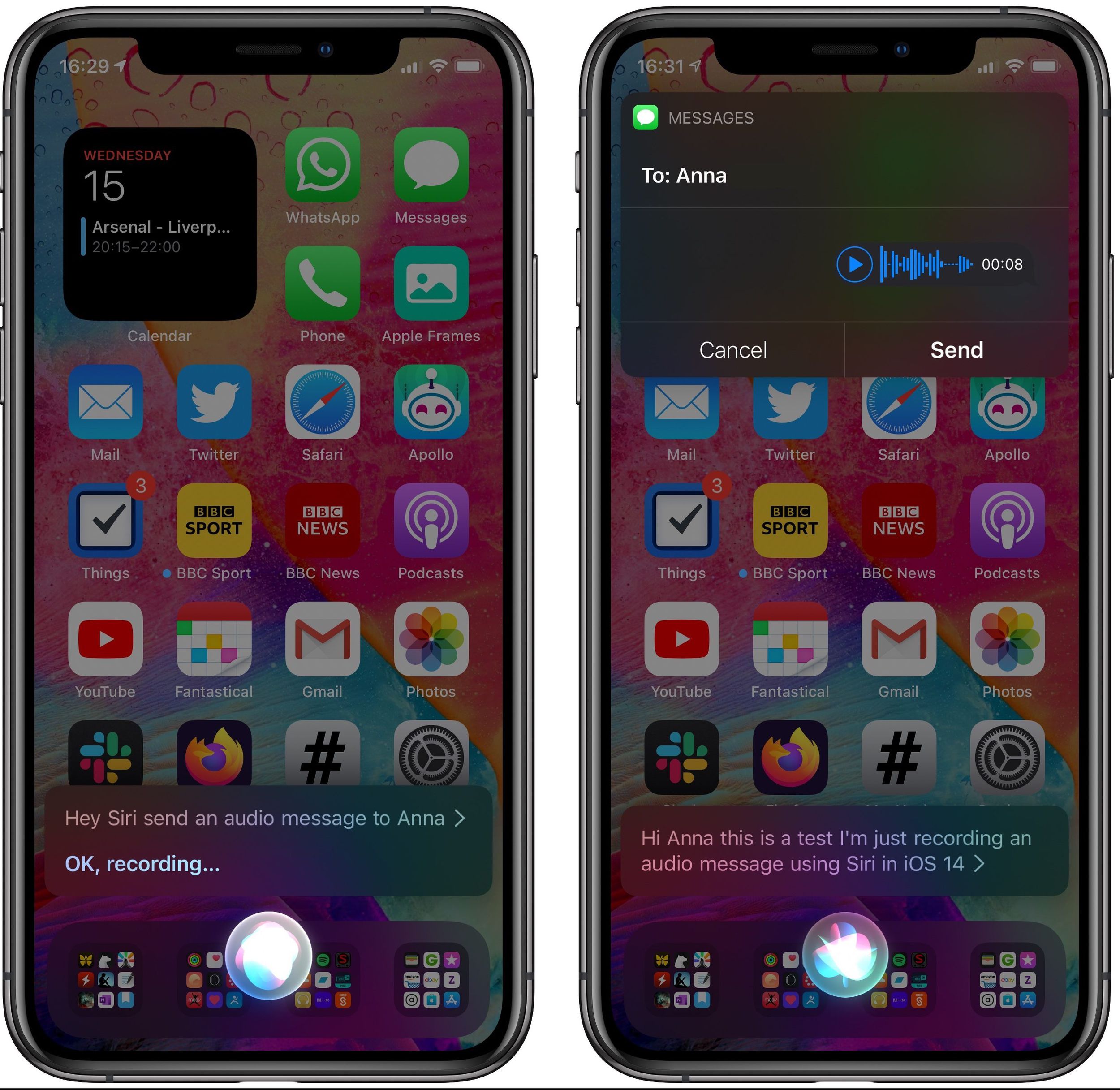
If you open the Messages app, you should see the recording show up in a conversation thread, indicating it's been sent.
Note that audio messages are automatically deleted after a couple of minutes unless they're saved, but you can change this default behavior and keep them permanently: In the Settings app, select Messages -> Expire -> Never.
For more details on iOS 14's new compact interface and communication features, be sure to check out our iOS 14 roundup.
Popular Stories

Apple Responds to iPhone Duo Display Cracking Reports

Crackgate? iPhone Duo Owners Report Screens Breaking Along the Hinge

