
iOS 15 FaceTime Guide: New Features, SharePlay, Screen Share, Updates
iOS 15 FaceTime Guide: New Features, SharePlay, Screen Share, UpdatesWednesday December 22, 2021 2:46 PM PST by Juli CloverApple in iOS 15 is making major changes to the FaceTime app, introducing a whole range of new features that

Table of Contents
- 1. SharePlay (Added in iOS 15.1)
- 2. Watch Movies and TV
- 3. Listen to Music
- 4. Share Your Screen
- 5. SharePlay Messages
- 6. Create a FaceTime Link
- 7. FaceTime on PCs and Android Devices
- 8. Spatial Audio
- 9. Grid View
- 10. Portrait Mode
- 11. Microphone modes
- 12. Mute Alerts
- 13. Zoom
- 14. Guide Feedback
- 15. Popular Stories
- 16. iPhone Duo's Hidden FaceTime Camera Takes 'Trash' Photos
- 17. Why Can't iPhone Duo Users Make Eye Contact on FaceTime?
- 18. iOS 27.2 Expands Dual Capture to Group FaceTime
- 19. Next Article
iOS 15 FaceTime Guide: New Features, SharePlay, Screen Share, Updates
Apple in iOS 15 is making major changes to the FaceTime app, introducing a whole range of new features that turn FaceTime into the ultimate hub for interacting with friends, family, coworkers, and more.

Our FaceTime guide outlines everything that's new in the FaceTime app in iOS 15 and iPadOS 15, and many of these features are also in macOS Monterey and can even be used in tvOS 15. We've also included detailed how tos and tutorials so you can dive right into FaceTime after upgrading.
SharePlay (Added in iOS 15.1)
SharePlay is FaceTime's biggest new feature, and it's basically a way for you to do more on FaceTime calls with your friends and family. You can watch TV together, listen to music, and share your screen. SharePlay is was introduced in iOS 15.1, iPadOS 15.1, tvOS 15.1, and macOS Monterey 12.1 after being delayed from the initial launch versions of the software.

SharePlay makes the FaceTime experience a whole lot better because it can be used for screen sharing, watching movies and TV together, or listening to music with Apple Music. Third-party app developers can also build SharePlay into their apps, so there are a whole range of new FaceTime games and experiences.
- iOS 15: How to Share Your Screen on a FaceTime Call
- iOS 15: How to Watch Movies Together Using FaceTime
Watch Movies and TV
When you're on a FaceTime call, you can choose to stream movies or TV shows and everyone on the call will see the same synced playback and controls. You can watch on the iPhone or iPad, or swap over to the Apple TV to watch on the big screen while you continue your call.

As you chat and watch, the volume will automatically adjust so that you can hear everyone talking without missing the show.
You can FaceTime, watch content, and also do other things on your iPhone for the ultimate multitasking experience.
Listen to Music
If you play an Apple Music song while on a FaceTime call with friends, everyone can hear what's playing and can contribute to a shared music queue. The SharePlay music interface offers up synced playback controls, and everyone can see what's coming up next.

You can listen to music over your iPhone, or send it over to the HomePod while remaining on the FaceTime call.
Share Your Screen
Apple has long allowed screen sharing over Messages on the Mac, and this year, that functionality is coming to the iPhone and iPad too. You can share your iPhone's screen with everyone on the call, which is useful when you're planning a vacation, choosing a movie, browsing through a photo album, and more.

SharePlay Messages
If you're on a FaceTime call but want to send a quick link or image over to the group, you can access your group Messages chat right from the call.
Create a FaceTime Link
Apple changed how FaceTime works in iOS 15, so you can create something more akin to a Zoom link, but for FaceTime. You can make a FaceTime link that other people can tap to join your FaceTime call.

Links let you schedule FaceTime calls in advance and then share the links with others so everyone can join the meeting or group chat at the appropriate time. FaceTime integrates directly with the Apple Calendar app.
To create a link, just open up the FaceTime app and then tap the "Create Link" option next to "New FaceTime." You can share the link in a text message, another messaging service, an email, or AirDrop it, and people can click it to join in.
FaceTime on PCs and Android Devices
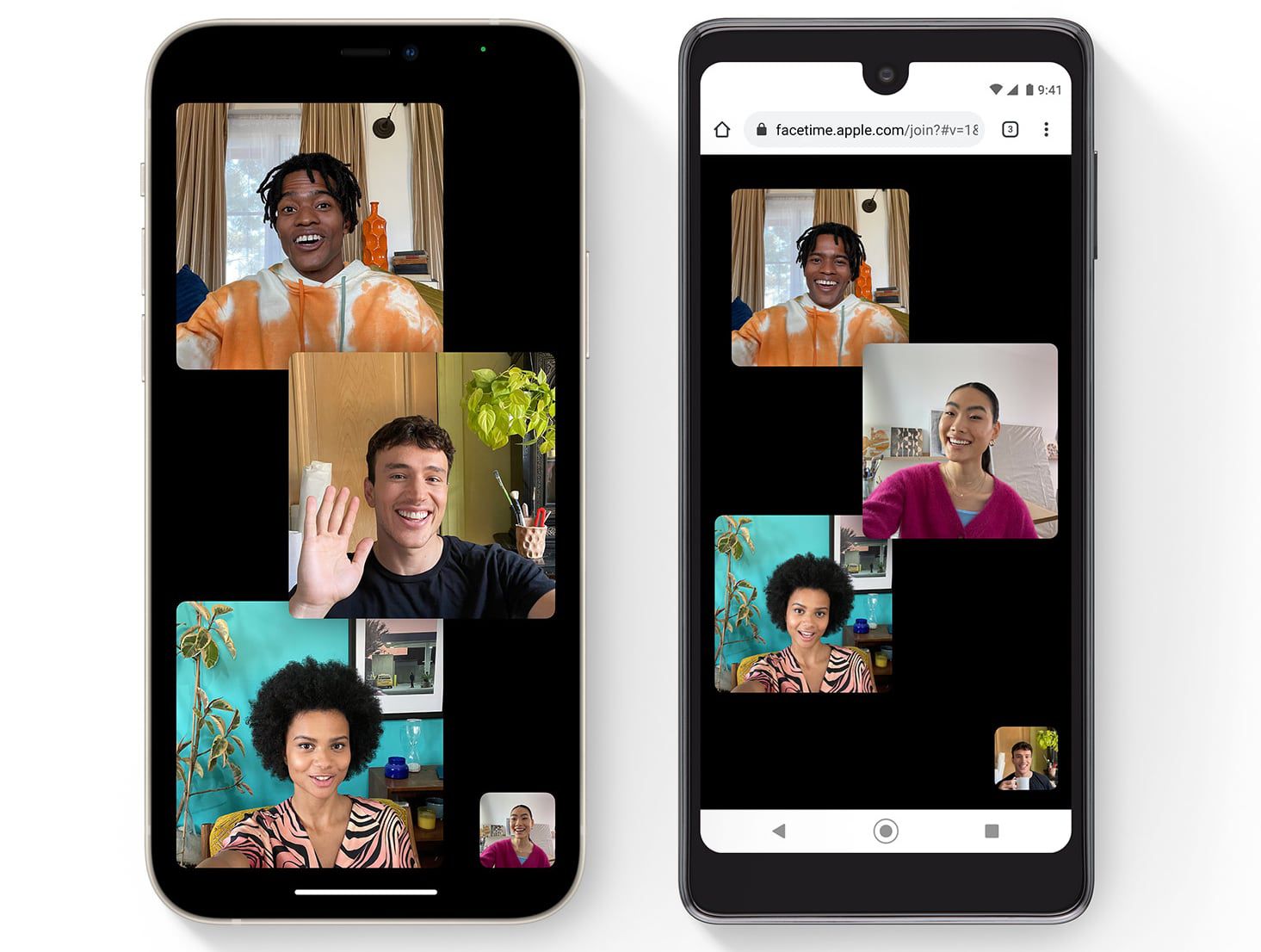
Apple created FaceTime links because there's a new option to join FaceTime calls on the web, which means PC and Android users can participate in FaceTime for the first time.

An iPhone, Mac, or iPad user needs to create a FaceTime link, but once created, anyone can tap it to join. To join from the web, Chrome or Edge browsers are required. FaceTime from the web works on-on-one or in Group FaceTime calls.
Spatial Audio
FaceTime supports Spatial Audio in iOS 15, so if you're chatting with multiple people and their pictures are in different spots on your screen, it sounds like their voices are coming from the right spot on your device.
Apple says that individual voices are meant to sound like they're coming from the direction in which each person is positioned on the screen, which is meant to make conversations flow more naturally.
Spatial Audio requires an iPhone with the A12 Bionic or later.
Grid View
FaceTime in iOS 15 has a new Grid View, which puts FaceTime on par with other videoconferencing apps. You can organize everyone into the same-size tiles, and the person speaking is automatically highlighted.

Portrait Mode
FaceTime's Portrait Mode blurs out the background behind you and puts the focus on you. An A12 Bionic chip or later is required for this feature.

Microphone modes
There are two microphone modes in iOS 15. Voice Isolation is designed to minimize background noises to focus on your voice, while Wide Spectrum makes sure the ambient noise is audible, something that's ideal for group calls.
- iOS 15: How to Block Background Noise in FaceTime With Voice Isolation
- iOS 15: How to Enable Voice Isolation Mode in FaceTime
- iOS 15: How to Enable Wide Spectrum Audio on a FaceTime Call
Mute Alerts
If you're on a FaceTime call and you start talking while muted, you'll see an alert on your iPhone that lets you know the mute button is on.
Zoom
While using the rear-facing camera on a FaceTime call, there's an option to zoom in on what's on the screen.
Guide Feedback
Have questions about FaceTime in iOS 15, know of a feature we left out, or want to offer feedback on this guide? Send us an email here.
Popular Stories

iPhone Duo's Hidden FaceTime Camera Takes 'Trash' Photos
Why Can't iPhone Duo Users Make Eye Contact on FaceTime?

