FaceTime is great for when you want to stay in touch with friends and family, but it's also good at dealing with people you don't want to hear from, too. Apple provides features on Mac and iOS that allow you to block nuisance call
FaceTime is great for when you want to stay in touch with friends and family, but it's also good at dealing with people you don't want to hear from, too.
Apple provides features on Mac and iOS that allow you to block nuisance calls from the same number coming through to your FaceTime account. The steps below show you how it works.
How to Block Unwanted FaceTime Calls on Your iPhone or iPad
Launch the FaceTime app on your iPhone or iPad.
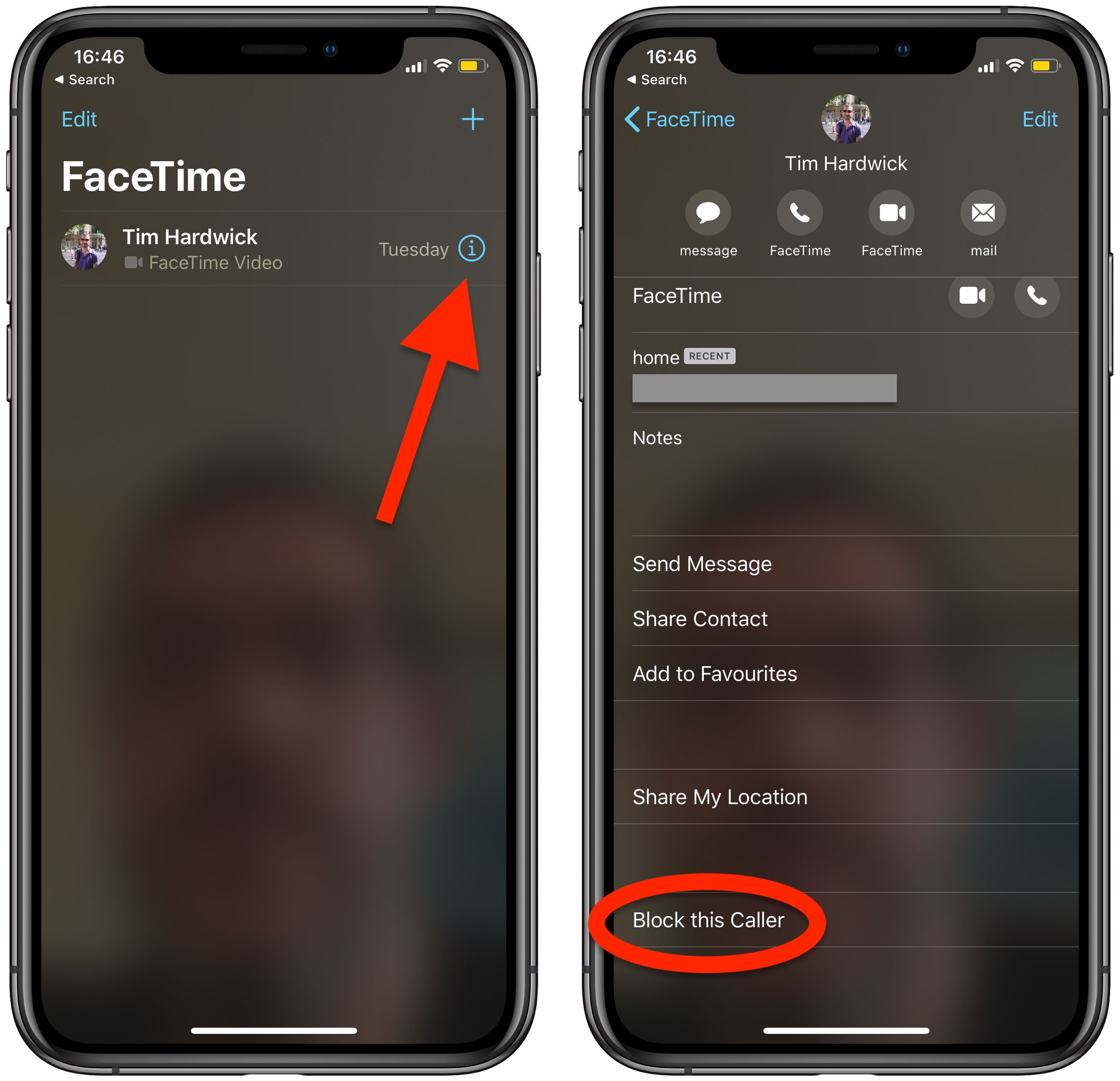
Tap the Info (the encircled "i" icon) button next to the name of the contact that you want to block.
Tap Block this Caller at the bottom of the screen.
Tap Block Contact to confirm.
The name, number, and email addresses associated with the contact are now added to your block list.
How to Block Unwanted FaceTime Calls on Mac
Launch the FaceTime app from your Mac's Applications folder.
Find the caller you want to block in the sidebar menu.
Right-click (or Ctrl-click) on the contact and select Block this caller from the contextual menu.
The name, number, and email addresses associated with the contact are now added to your block list.
Wednesday October 21, 2026 11:36 am PDT by Juli Clover
The iPhone Duo's inner screen has an under-display front camera that's largely hidden from view. It's the first time we've seen an under-display camera on an iPhone, and it turns out there's a reason Apple hasn't used the technology before.
Apple said the camera offers 1080p video recording, but didn't mention photo quality. Gizmodo said it's a 4-megapixel camera and described the photos as...
Monday October 26, 2026 3:49 pm PDT by Tim Hardwick
FaceTime's Eye Contact setting is missing on the iPhone Duo, MacRumors can confirm. The setting was first flagged as absent by MacRumors forum member TwoBytes, who noticed their eyes looking "a little off" during a call.
Introduced in iOS 14, Eye Contact uses machine learning to subtly adjust your eyes during a video call to make it seem like you're looking into the camera lens, even though ...
Monday October 26, 2026 12:46 pm PDT by Juli Clover
The iOS 27.2 update Apple released today allows the FaceTime Dual Capture feature to be used in Group FaceTime calls.
Dual Capture is a feature that lets you stream FaceTime video content from the front and rear cameras at the same time. On a compatible device running iOS 27, flipping the camera while on a FaceTime call automatically turns on Dual Capture.
Dual Capture is available on...


 FaceTime is great for when you want to stay in touch with friends and family, but it's also good at dealing with people you don't want to hear from, too.