
How to Sign Up for iCloud Family Storage Plans in iOS 11
How to Sign Up for iCloud Family Storage Plans in iOS 11Thursday September 21, 2017 4:19 PM PDT by Juli CloverApple's Family Sharing feature allows you to share music, movies, apps, photos, and more with family members, and in iOS
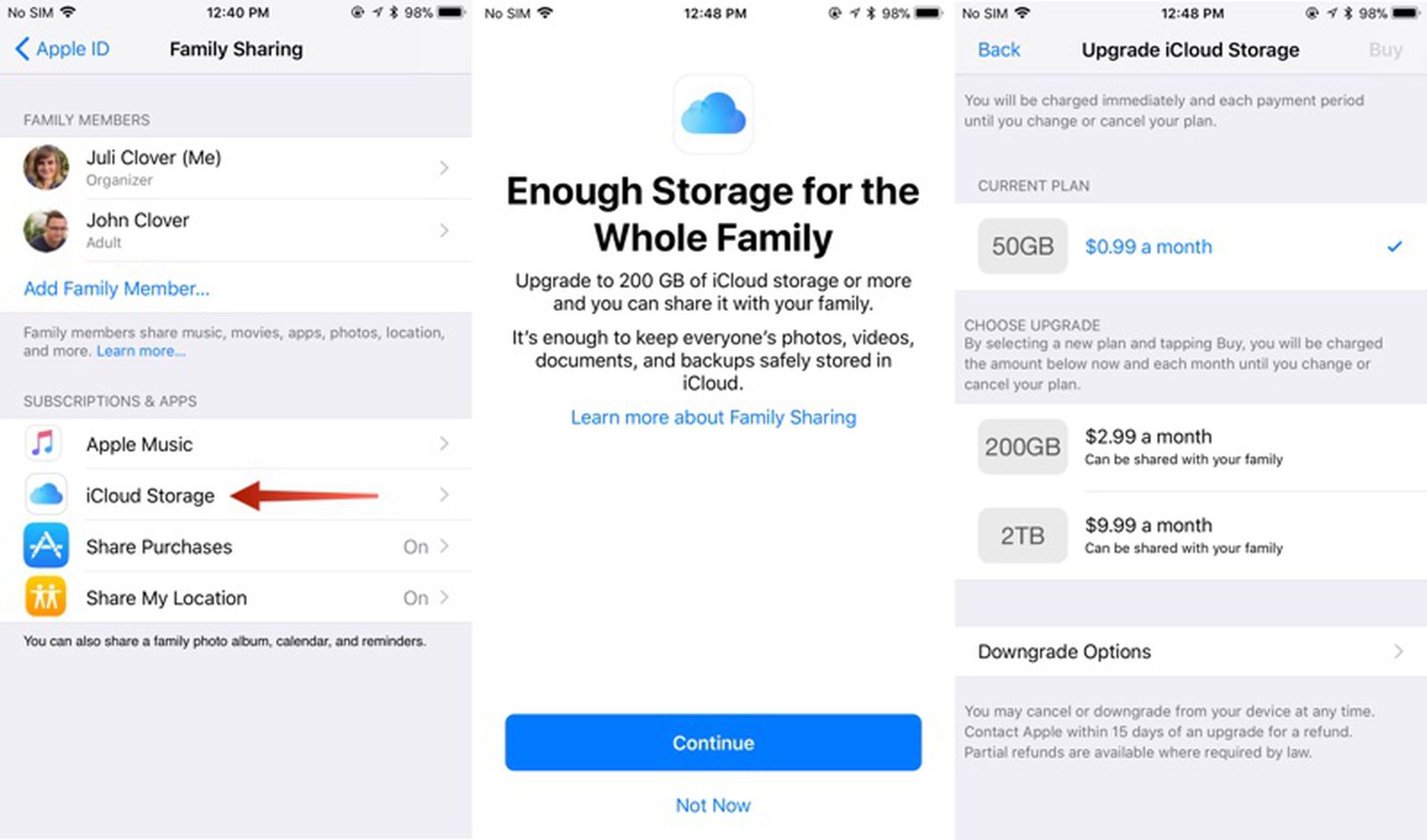
Table of Contents
- 1. How to Upgrade to a Family iCloud Storage Plan
- 2. How to Stop Sharing iCloud Storage With Family
- 3. How to Downgrade iCloud Storage
- 4. Popular Stories
- 5. Apple Quietly Boosts Email Feature for iCloud+ Subscribers
- 6. Apple Quietly Triples iCloud Mail Alias Limit to Nine
- 7. Apple Responds to iPhone Duo Display Cracking Reports
- 8. Next Article
How to Sign Up for iCloud Family Storage Plans in iOS 11
Apple's Family Sharing feature allows you to share music, movies, apps, photos, and more with family members, and in iOS 11, Family Sharing extends to Apple's iCloud Storage plans.
When you purchase a 200GB or 2TB iCloud Storage plan, all members of your family can share the storage space. Depending on how many family members you have, family plans offer more storage at a better price than individual plans.
For example, a 50GB storage plan is priced at $0.99 per person. For two people, the $2.99 200GB plan offers each person an additional 50GB of storage for only $1 more.
How to Upgrade to a Family iCloud Storage Plan
- Open the Settings app.
- Tap on your Apple ID profile at the top of the app.
- Choose "Family Sharing," the sixth option in the list.
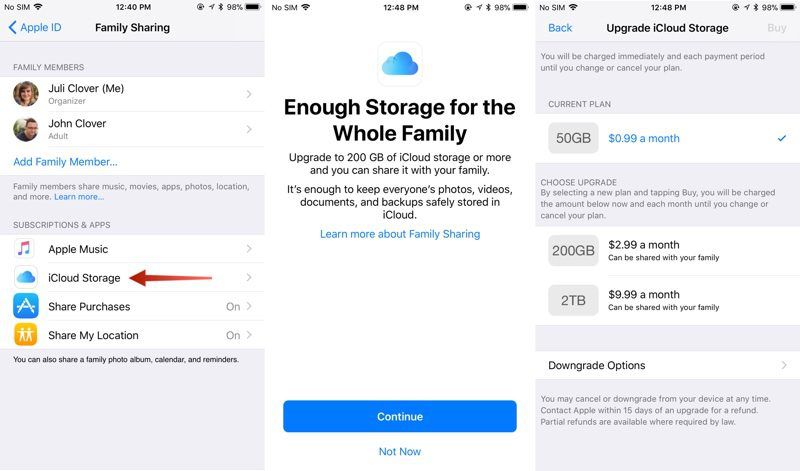
- Tap on "iCloud Storage" to bring up a notice about the new Family Sharing options.
- Click "Continue" to choose a plan.
- Pick a 200GB or 2TB plan.
You can also access the plan settings through the standard iCloud Storage menu in the Settings app, accessible by going to iCloud > Manage Storage after tapping on your profile.
How to Stop Sharing iCloud Storage With Family
You can sign up for a 2TB or 200GB storage plan and keep family members from accessing your storage space. Here's how:
- Open the Settings app.
- Tap on your Apple ID profile.
- Choose "Family Sharing."
- Choose "iCloud Storage."
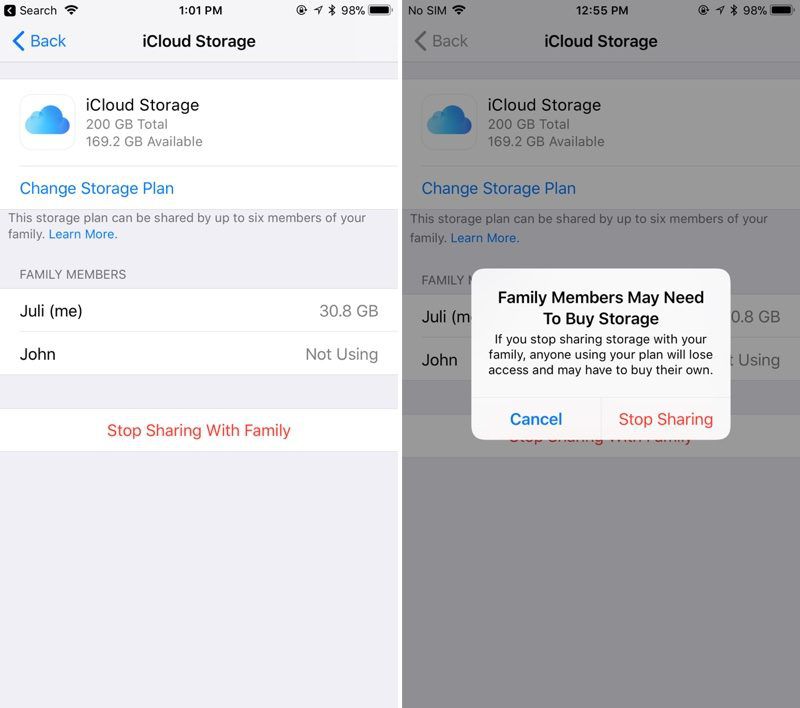
- Tap on "Stop Sharing With Family."
How to Downgrade iCloud Storage
If you want to go back to a cheaper iCloud Storage option, downgrading is as simple as choosing a new plan. New rates won't kick in until the next billing period.
- Open the Settings app.
- Tap on your Apple ID profile.
- Choose "iCloud."
- Tap on "Manage Storage."
- Choose "Change" under the iCloud Storage option.
- Select a 5GB or 50GB plan to downgrade.
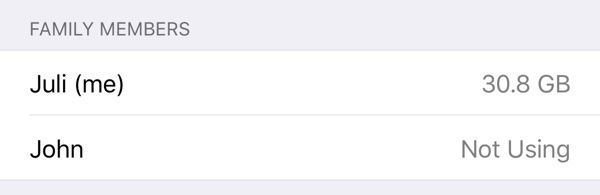
It's important to note that there's no way to allocate how much storage each person gets when using one of Apple's new iCloud Storage plans for families, so it's not always an even split. If a family member is hogging too much space, that's a problem that will need to be worked out offline. You can see how much storage each family member is using by going to profile > Family Sharing > iCloud Storage.
When you choose a 200GB or 2TB storage plan and opt in to Family Sharing, family members who are on the free 5GB plan will be upgraded automatically and will begin using the family storage plan.
Family members who already have a paid plan will need to opt in to the family storage plan to transfer over from their own plans. If they want to have separate storage, your family members can continue to pay for their own plans and choose not to opt into the family plan.
To let your family know that you've signed up for a family iCloud plan, Apple offers an automatic iMessage alert that can be sent out to family members that lets them easily switch over to the family plan.
Popular Stories

Apple Quietly Boosts Email Feature for iCloud+ Subscribers
Apple Quietly Triples iCloud Mail Alias Limit to Nine

